A Minecraft server for friends in the UK and Europe
Cubepals’ servers for Europe are in Frankfurt, in Germany. There isn’t one in the UK. For North America, they’re in Virginia, in the US. This guide is for groups on Minecraft: Java Edition deciding where their world should live.
Where your server runs
You don’t have to pick. When you make a server, Cubepals starts it in the region nearest you, from the country you’re in: Europe for the UK, Ireland, the Netherlands, the Nordics and the rest of Europe, and North America for the US and Canada. The bar at the bottom of the create page says which, and pressing it lets you choose the other.

The regions are run on Fly.io (opens in a new tab), whose region list puts Europe’s, “fra”, in Frankfurt, Germany, and North America’s, “iad”, in Ashburn, Virginia. For a group spread around Europe, Frankfurt is central: closer to your players means less lag.
Friends in the US and Europe in one group
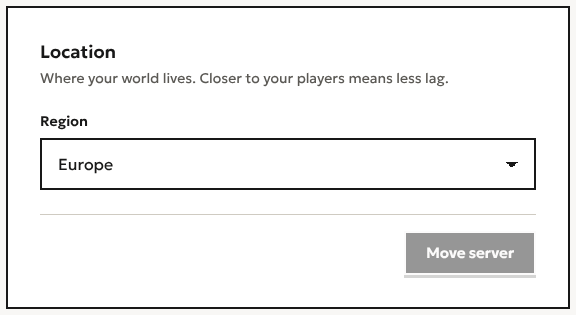
A server runs in one place, so someone in a mixed group is further from it than the rest. It starts where the person making it is. If most of the group is on the other side of the Atlantic, pick their region in the bar instead, or move it later: in the server’s Settings, under Location, choose the Region and press Move server.
Prices
Prices are in US dollars and include VAT where it applies. The plans and what each includes are on Pricing, and what a server costs explains how hours work.
Questions
Is there a UK server?
No. Players in the UK and Ireland start in Europe, which is Frankfurt.
Can I change the region after making it?
Yes: Settings, then Location, then Move server. The world moves with it.
How do my friends join?
The same way wherever the server is: Multiplayer, then Add Server, and paste the address. Making a server for friends shows it step by step.
Start a world with your friends
Minecraft server hosting for friends. Send them the address and they’re in. Start with a free trial, no card needed.
Create a server