A Minecraft server that starts when someone joins
For a server to start when someone joins, something has to answer at its address while it’s off, and start it on the first join. On a computer of your own, a small program such as lazymc does that. On Cubepals every server already works this way: your friends join from the normal game, and it wakes. This guide is for Minecraft: Java Edition.
How it works on Cubepals
There’s nothing to install or switch on. The server stays in your friends’ Multiplayer list under the same address, and while it’s asleep the list says so: Sleeping · join to wake it up, under its own message and picture.
They join like any server. The join waits while it wakes, and it’s usually back in a couple of seconds, with the world as they left it. Sometimes, such as the first join after a change, it takes up to a minute. One resting in storage after weeks without play takes a couple of minutes.
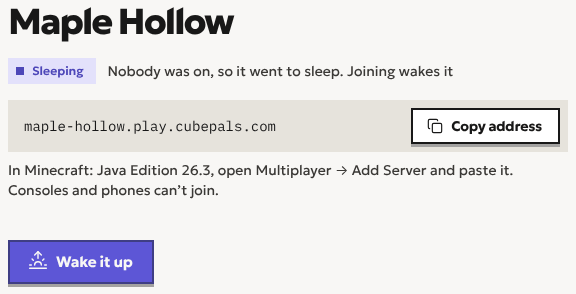
Nobody has to start it for anyone, and you don’t need to be online for your friends to play.
When does it go back to sleep?
10 minutes after everyone leaves (15 on Plus), so someone who pops out for a minute comes back to it still running. It saves the world before it stops.
Hours only count while it’s running. A server for friends spends most of the week with nobody on it, and a sleeping one uses none of your hours in that time. That’s what lets the free trial include 20 hours in all, at most 2 a day with nothing to pay. What a server costs goes through the plans.
Doing it yourself: lazymc and Sleeping Server Starter
If you run your own server, two free programs make it start on a join:
- lazymc (opens in a new tab), which says it puts “your Minecraft server to rest when idle”. It sits in front of the server, answers the list while it’s off, and starts it when someone joins. It can hold that join until the server is up.
- Sleeping Server Starter (opens in a new tab) does the same, and by default tells whoever joins “Waking server up, come back in a minute”, so they join again.
Both run beside the server, on the machine that hosts it. That machine stays on, and your friends need to reach it, which at home usually means opening a port on your router: hosting without port forwarding explains the ways around it. They rest the server, not the computer.
Which one to pick
Do it yourself if you already have a computer or a rented server that’s on all the time, you’re happy to keep it updated, and you want full control of it. lazymc costs nothing and does the job well.
Pick Cubepals if nobody should have to keep a computer on, open a port, or look after the server. Every server starts on a join and sleeps when everyone leaves, with no setup.
“I want it always on”
Usually that means: nobody should have to ask you to start it. A server that wakes when someone joins does that, whoever joins and whenever. It isn’t running all the time, and that’s the point: you’d be paying for the hours nobody plays.
A world nobody plays for a while
It sleeps as soon as everyone leaves. After two weeks without play (a month on Plus) it rests in storage: joining still wakes it, it just takes a couple of minutes. On the trial, a world nobody has played for a year is deleted, and you’re emailed twice before, with a way to keep it and a download.
Questions
Can a Minecraft server start automatically when a player joins?
Yes. On your own machine, a program such as lazymc starts it on a join. On Cubepals every server does it, with nothing to set up.
Can my friends start the server without me?
Yes. Any of them can wake it by joining, whether or not you’re online.
What do my friends see while it’s asleep?
The server in their list as usual, with “Sleeping · join to wake it up” under its message. Joining is all it takes.
Does it work on Bedrock?
Not yet. Cubepals servers are for Java Edition, so a friend on a phone or a console can’t join. Bedrock support is coming soon, so friends on phones and tablets can join too. Sleeping Server Starter has an option for Bedrock if you host your own.
Does sleeping lose anything?
No. It saves the world before it stops, and wakes up with everything where it was.
Can I keep it from sleeping?
It sleeps when nobody’s on, so it never uses hours on an empty world. The plans and their timers are on Pricing.
How do I make one?
Making a server for friends goes step by step. Every Cubepals server starts on a join like this.
Start a world with your friends
Minecraft server hosting for friends. Send them the address and they’re in. Start with a free trial, no card needed.
Create a server